Here is a quick post to give you all the link to our ELA text online. As soon as you get to the site, you will notice two prompts: one for a student login and another for educators. This week, the district will be working on inputting every student from Infinite Campus into the Springboard system. As soon as that is complete, I will have user names and passwords for everyone.
If you have the capacity to make a Bookmark on your browser, add this one. It may be used quite a bit:
Springboard Text Online
Holla.
~Mr. D
Showing posts with label Technology. Show all posts
Showing posts with label Technology. Show all posts
Monday, August 8, 2016

Saturday, August 6, 2016
Create Your Gmail Account OR Blog
Thursday, August 4, 2016
Open House
If there was any doubt that the first day of school was quickly approaching, Open House surely squashed any uncertainty.
I have been known to create classroom-centered podcasts throughout the course of a school year, available for free at the iTunes Store. To find them, simply search for Jason Davidson's Podcasts within the iTunes Store search bar. I deleted all of last year's podcasts, except for one. Just for kicks and giggles on this Throwback Tuesday, here is the podcast I recorded nearly two years ago after the 2012 Open House. It's only five minutes long but I couldn't record anything this year that would communicate my sincere feelings about how I revere my position as your (or your child's) teacher any better. Enjoy!
TheMrDShow Podcast: Episode One - Open House Perspective
I have been known to create classroom-centered podcasts throughout the course of a school year, available for free at the iTunes Store. To find them, simply search for Jason Davidson's Podcasts within the iTunes Store search bar. I deleted all of last year's podcasts, except for one. Just for kicks and giggles on this Throwback Tuesday, here is the podcast I recorded nearly two years ago after the 2012 Open House. It's only five minutes long but I couldn't record anything this year that would communicate my sincere feelings about how I revere my position as your (or your child's) teacher any better. Enjoy!
TheMrDShow Podcast: Episode One - Open House Perspective
Friday, June 3, 2016
Wikipedia: It's Not a Dirty Word
Continuing on with my posts regarding educational technology as we gear up for another school year, this post focuses on Wikipedia.
For years since I left Western Kentucky University (2003), Wikipedia has gained increasing momentum, filling up so much space on the web that a person couldn't possibly read all of its voluminous entries in a single lifetime. However, it has gained nearly as many detractors since its inception, especially in the realm of education.
Below is an article from Dr. Scott McLeod outlining how to change administrative perception of Wikipedia. Let's do it:

For years since I left Western Kentucky University (2003), Wikipedia has gained increasing momentum, filling up so much space on the web that a person couldn't possibly read all of its voluminous entries in a single lifetime. However, it has gained nearly as many detractors since its inception, especially in the realm of education.
Below is an article from Dr. Scott McLeod outlining how to change administrative perception of Wikipedia. Let's do it:
Teaching administrators about Wikipedia
Last year a middle school librarian in New Jersey received a lot of media attention for her anti-Wikipedia campaign:
Linda O'Connor regards Wikipedia the same way former first lady Nancy Reagan campaigned against drugs. . . . She put up a sign saying "Just Say No to Wikipedia" over the computers in the school library. . . . Wikipedia is blocked on all computers in the Warren Hills Regional School District.

At the time I said that I was highly skeptical about this librarian's stance. On any given day, approximately 1 in 10 Internet users visits Wikipedia. This fact alone should indicate that there's something going on worth paying attention to, something that warrants a more nuanced approach than simply prohibiting access. If it was terrible, it wouldn’t maintain its audience. Folks who take the time to understand Wikipedia learn very quickly that it's actually an amazing site. It's already 8 times larger than the Encyclopedia Brittanica, is growing incredibly quickly, and has been created entirely by volunteers. Peer-reviewed studies published in our top scientific journals have shown that it is as accurate as the Brittanica too, particularly those articles that reside in its mainstream core (rather than at the fringes).
If all of this is true, then why are so many educators, librarians, and media specialists upset about Wikipedia? I think the concerns stem from several different sources. One is their beliefs about accuracy. We tend to assume that print materials such as the Brittanica and school textbooks are error-free when in actuality they contain numerous mistakes. Even when identified, these mistakes usually linger until the next edition is printed and purchased (unlike Wikipedia which corrects known mistakes almost instantly). Second, the idea that volunteers can create something as valuable as that created by experts strikes us as ludicrous. But in this case it happens to be true. Sure, at any given second, some vandal or incompetent may have inserted something inaccurate into a particular article. But over time (and often unbelievably quickly), Wikipedia is remarkably self-healing, unlike the paper materials on our bookshelves. Wikipedia also is a counter to outdated information. How many of the reference books in libraries and school media centers contain incomplete or inaccurate information simply because they're old? Wikipedia doesn't have that problem.
Our students deserve better training about how to navigate our new, complex, online information landscape. They don't learn about information literacy, bias, media literacy, assessment of online validity, and other critical online skills by being denied access to that information. They don't learn how to cite and use online resources appropriately if they can't use those resources and learn from their mistakes because the materials are banned.
If you take half an hour to show administrators these things, their mindset changes. I like to have school leaders visit some Wikipedia pages with me. I start by showing them the asphalt article. After we look at the article itself, I show them the history tab (and take them all the way back to the first few revisions) and then the discussion tab. We talk about what we see and what their perceptions are regarding accuracy, quality, and neutrality. Then I put them into groups to check out more controversial articles like Sarah Palin, Islam, Vladimir Putin, orPluto. They examine the articles for bias and inaccuracy and spend some time in the history and discussion areas.
The administrators inevitably walk away with a deeper understanding of Wikipedia and a greater appreciation for the safeguards that have evolved to protect against abuse and inaccuracy. Many of them also begin to see the site as an excellent lens for teaching students about how, as a society, we construct knowledge, negotiate meaning, and develop collective understanding. Some even begin to think about how their students might be able to serve as Wikipedia contributors. In the end, that richer understanding may be more valuable than the content of the articles themselves.
How are you using Wikipedia to teach information literacy and critical thinking?
Thursday, June 2, 2016
Repost from @TheNerdyTeacher: Tech Integration and BTTF
One of the immeasurably great things about connecting to other educators via social media (i.e. Twitter) is the ability to learn from colleagues that I probably otherwise would never have met. One of those people is Nick Provenzano (@TheNerdyTeacher), whom I stumbled across very early in my search for like-minded educators. I became enamored quickly with his blog posts and, during a couple of days of my student-teacher leading the class, I read every single blog post he had written. Every. Single. One.
Now that I reread that, I see how that could come across as creepy.
Anyway, one of the things that got me hooked was posts such as the one below involving my favorite movie of all-time, Back to the Future.
Enjoy.
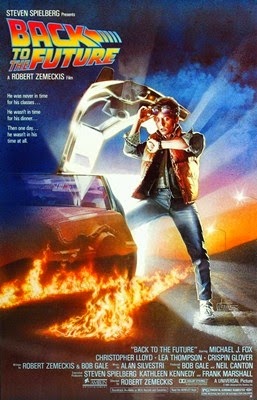
It is now time for the second installment of Everything I Ever Needed to Learn about Technology Integration I Learned from… The following quotes come from the first movie since many of the same lines are repeated in all three. I would like to thank everyone who took the time to vote and play a part in this silly venture by me. Here are the quotes and what I learned from them in no specific order.
George McFly: Last night, Darth Vader came down from planet Vulcan and told me that if I didn't take Lorraine out that he'd melt my brain.
I love helping other teachers integrate technology into their lessons. When teachers come to me and ask questions and want to know if there is anything out there that can improve what they already do, I get excited. However, there are still many teachers out there that do not and will not use new forms of technology in their classroom. Marty decided to scare his father into asking his mother out on a date. In schools, I’m not sure that fear is the best approach in getting teachers to try new things. Fear is what is usually keeping teachers away from new technology. I find it best to identify those teachers that might be resistant and slowly show them different ways new technology can be implemented into their lessons. Sometimes it takes only one piece of technology to get a teacher hooked and looking for other ways to spice up their lesson plans.
Marty McFly: Wait a minute, Doc. Ah... Are you telling me that you built a time machine... out of a DeLorean?
Dr. Emmett Brown: The way I see it, if you're gonna build a time machine into a car, why not do it with some style?
I find it funny when I have conversations with teachers and they talk about the great technology they use in the classroom and it turns out they have been using the same PowerPoint presentations since 1999. I agree with Doc Brown when he says, “…why not do it in style?” Go out and look for the best and the brightest technology out there and find a way to integrate it into the classroom. I recently moved my note taking lectures to Prezi and my kids love it. Last week, I added Wallwisher to my Prezis. I understand that this is not the path for everyone, but teachers should not be satisfied with the run of the mill. Go out and make a splash when you use technology.
Lou: You gonna order something, kid?
Marty McFly: Ah, yeah... Give me - Give me a Tab.
Lou: Tab? I can't give you a tab unless you order something.
Marty McFly: All right, give me a Pepsi Free.
Lou: You want a Pepsi, PAL, you're gonna pay for it.
Knowing your audience is important when it comes to convincing teachers to include more technology into their lessons. If you do not have common ground, they may have no idea what you are talking about. I saw this play out at my school recently. I started a blog for my school to identify helpful sites for teachers and students. My first post was about how to use the blog and I ended it with suggesting that teachers add my blog to their RSS Feed for easy following. I was hit with a bunch of emails asking me what RSS meant and how to use it. My follow up post was explaining RSS Feeds and how to use them. I forgot that not all of the teachers in my building knew all of the same terminology I did. I understood how frustrated Lou must have felt when this young kid was talking gibberish. I think it’s important to remember that frustration as I talk to other teachers.
Dr. Emmett Brown: I'm sure that in 1985 plutonium is available in every corner drugstore, but in 1955 it's a little hard to come by.
As I search for goodies on the world wide web, I often get frustrated when I find great sites, but my school blocks them for some unknown reasons or we do not have the correct plug-ins to view them. Also, I have sent some great sites to teachers that do not have the ability to look at them at home because their home set up is not able to handle it. High-powered technology is great for some teachers, but sometimes I need to remember to find the basic tools that all teachers will be able to use and try at home. Try to remember that all districts, sadly, were not created equal and we should try to find sites and new technology that is accessible to all classrooms.
Marvin Berry: [on the phone, as Marty plays "Johnny B. Goode"] Chuck. Chuck. It's Marvin - your cousin, Marvin BERRY. You know that new sound you're looking for? Well, listen to this.
Sharing is important. New technology does not search for teachers; teachers need to actively look for it themselves. Let’s be honest, some teachers are just not going to look for it. When I started this blog, my Twitter account and my school blog, it was because I wanted to share the great sites I found with the teachers of the world. If you find something that you think other teachers would like, do not hesitate to share it with as many people you want. If Marvin Berry never picks up the phone, think about all of the great music we would have missed.
Marty McFly: [following] What-what the heck is a gigawatt?
Don’t be afraid to ask questions if there is something new out there. Even though I think of myself as a tech savvy person, I have told myself it’s ok to ask questions of other people. Whether it’s on Twitter or another person in my building, if I have a question, I will ask. Even if you are the “tech guy/gal” of your building, don’t be afraid to ask questions of others.
Marty McFly: I guess you guys aren't ready for that, yet. But your kids are gonna love it.
Some teachers look at new technology and don’t understand how it will affect their lives. However, they need to understand that the new technology is not about directly impacting their lives, it’s about introducing new ideas to students who might take those tools and create amazing things with them. Teaching students with the same tools I was taught with is not going to help prepare them for college. (Side Note: I graduated HS in 1997 but never used email at school because we did not have it and never used the computer lab because we didn’t have one. Teachers didn’t even have computers in their room. I received a great education without them, but why would I want to go backward when I could have my students move forward?) It’s important to convince reluctant teachers that using new technology in the classroom is not about making the teachers better; it’s about preparing the students. (Side Note 2: My amazing wife, @JenniferPro, said this quote would be perfect for the post and she was right. Thanks!)
Needles – What are you, chicken?
Needles (played wonderfuly by Flea from the Red Hot Chili Peppers) does a great job at getting Marty to do what he wanted by calling him a chicken. Marty got into that car accident with the Rolls Royce and lost his job because he couldn’t ignore the name-calling. A simple, “Sticks and stones may break my bones but names will never hurt me” could have prevented all of his problems. I know that there are some teachers in my building that are not as open minded when it comes to using new technology in their classroom and delete my tech emails without even opening them, but I’m not going to let that dictate how I work. I will continue to send out the updates to help the teachers that want the help despite their silly comments.
Doc Brown: If you put your mind to it, you can accomplish anything.
This is just a great bit of advice from Doc. It applies to anyone in any field. I know I have said this to my students over the years and I truly believe it. Marty wants to become a Rock Star and with the help of the lyrics of Huey Lewis and the News, he can be a success. When I set out to use a new piece of technology I tell myself it is going to be a huge success and I will deal with any obstacles that arise. Think about Doc Brown the next time you plan to integrate new technology into the classroom.
I had a blast writing this post and I look forward to writing my next one. Thanks to IMDB for providing the exact quotes I needed.
- @TheNerdyTeacher
Now that I reread that, I see how that could come across as creepy.
Anyway, one of the things that got me hooked was posts such as the one below involving my favorite movie of all-time, Back to the Future.
Enjoy.
Everything I Ever Needed to Learn about Technology Integration I Learned from "Back to the Future"
It is now time for the second installment of Everything I Ever Needed to Learn about Technology Integration I Learned from… The following quotes come from the first movie since many of the same lines are repeated in all three. I would like to thank everyone who took the time to vote and play a part in this silly venture by me. Here are the quotes and what I learned from them in no specific order.
George McFly: Last night, Darth Vader came down from planet Vulcan and told me that if I didn't take Lorraine out that he'd melt my brain.
I love helping other teachers integrate technology into their lessons. When teachers come to me and ask questions and want to know if there is anything out there that can improve what they already do, I get excited. However, there are still many teachers out there that do not and will not use new forms of technology in their classroom. Marty decided to scare his father into asking his mother out on a date. In schools, I’m not sure that fear is the best approach in getting teachers to try new things. Fear is what is usually keeping teachers away from new technology. I find it best to identify those teachers that might be resistant and slowly show them different ways new technology can be implemented into their lessons. Sometimes it takes only one piece of technology to get a teacher hooked and looking for other ways to spice up their lesson plans.
Marty McFly: Wait a minute, Doc. Ah... Are you telling me that you built a time machine... out of a DeLorean?
Dr. Emmett Brown: The way I see it, if you're gonna build a time machine into a car, why not do it with some style?
I find it funny when I have conversations with teachers and they talk about the great technology they use in the classroom and it turns out they have been using the same PowerPoint presentations since 1999. I agree with Doc Brown when he says, “…why not do it in style?” Go out and look for the best and the brightest technology out there and find a way to integrate it into the classroom. I recently moved my note taking lectures to Prezi and my kids love it. Last week, I added Wallwisher to my Prezis. I understand that this is not the path for everyone, but teachers should not be satisfied with the run of the mill. Go out and make a splash when you use technology.
Lou: You gonna order something, kid?
Marty McFly: Ah, yeah... Give me - Give me a Tab.
Lou: Tab? I can't give you a tab unless you order something.
Marty McFly: All right, give me a Pepsi Free.
Lou: You want a Pepsi, PAL, you're gonna pay for it.
Knowing your audience is important when it comes to convincing teachers to include more technology into their lessons. If you do not have common ground, they may have no idea what you are talking about. I saw this play out at my school recently. I started a blog for my school to identify helpful sites for teachers and students. My first post was about how to use the blog and I ended it with suggesting that teachers add my blog to their RSS Feed for easy following. I was hit with a bunch of emails asking me what RSS meant and how to use it. My follow up post was explaining RSS Feeds and how to use them. I forgot that not all of the teachers in my building knew all of the same terminology I did. I understood how frustrated Lou must have felt when this young kid was talking gibberish. I think it’s important to remember that frustration as I talk to other teachers.
Dr. Emmett Brown: I'm sure that in 1985 plutonium is available in every corner drugstore, but in 1955 it's a little hard to come by.
As I search for goodies on the world wide web, I often get frustrated when I find great sites, but my school blocks them for some unknown reasons or we do not have the correct plug-ins to view them. Also, I have sent some great sites to teachers that do not have the ability to look at them at home because their home set up is not able to handle it. High-powered technology is great for some teachers, but sometimes I need to remember to find the basic tools that all teachers will be able to use and try at home. Try to remember that all districts, sadly, were not created equal and we should try to find sites and new technology that is accessible to all classrooms.
Marvin Berry: [on the phone, as Marty plays "Johnny B. Goode"] Chuck. Chuck. It's Marvin - your cousin, Marvin BERRY. You know that new sound you're looking for? Well, listen to this.
Sharing is important. New technology does not search for teachers; teachers need to actively look for it themselves. Let’s be honest, some teachers are just not going to look for it. When I started this blog, my Twitter account and my school blog, it was because I wanted to share the great sites I found with the teachers of the world. If you find something that you think other teachers would like, do not hesitate to share it with as many people you want. If Marvin Berry never picks up the phone, think about all of the great music we would have missed.
Marty McFly: [following] What-what the heck is a gigawatt?
Don’t be afraid to ask questions if there is something new out there. Even though I think of myself as a tech savvy person, I have told myself it’s ok to ask questions of other people. Whether it’s on Twitter or another person in my building, if I have a question, I will ask. Even if you are the “tech guy/gal” of your building, don’t be afraid to ask questions of others.
Marty McFly: I guess you guys aren't ready for that, yet. But your kids are gonna love it.
Some teachers look at new technology and don’t understand how it will affect their lives. However, they need to understand that the new technology is not about directly impacting their lives, it’s about introducing new ideas to students who might take those tools and create amazing things with them. Teaching students with the same tools I was taught with is not going to help prepare them for college. (Side Note: I graduated HS in 1997 but never used email at school because we did not have it and never used the computer lab because we didn’t have one. Teachers didn’t even have computers in their room. I received a great education without them, but why would I want to go backward when I could have my students move forward?) It’s important to convince reluctant teachers that using new technology in the classroom is not about making the teachers better; it’s about preparing the students. (Side Note 2: My amazing wife, @JenniferPro, said this quote would be perfect for the post and she was right. Thanks!)
Needles – What are you, chicken?
Needles (played wonderfuly by Flea from the Red Hot Chili Peppers) does a great job at getting Marty to do what he wanted by calling him a chicken. Marty got into that car accident with the Rolls Royce and lost his job because he couldn’t ignore the name-calling. A simple, “Sticks and stones may break my bones but names will never hurt me” could have prevented all of his problems. I know that there are some teachers in my building that are not as open minded when it comes to using new technology in their classroom and delete my tech emails without even opening them, but I’m not going to let that dictate how I work. I will continue to send out the updates to help the teachers that want the help despite their silly comments.
Doc Brown: If you put your mind to it, you can accomplish anything.
This is just a great bit of advice from Doc. It applies to anyone in any field. I know I have said this to my students over the years and I truly believe it. Marty wants to become a Rock Star and with the help of the lyrics of Huey Lewis and the News, he can be a success. When I set out to use a new piece of technology I tell myself it is going to be a huge success and I will deal with any obstacles that arise. Think about Doc Brown the next time you plan to integrate new technology into the classroom.
I had a blast writing this post and I look forward to writing my next one. Thanks to IMDB for providing the exact quotes I needed.
- @TheNerdyTeacher
Monday, May 16, 2016
Heroes

In ELA Level III (8th grade English/Language Arts), our opening unit revolves around HEROES. One of our guiding questions is simply,
What defines a hero?
At the end of the unit, students will be asked to write an informational essay on their personal definition of heroism. Throughout the unit, students will be asked to read, research, and discuss different aspects of HEROISM, including varying strategies on how to go about the sometimes complicated process of defining more abstract and complex concepts. Those strategies include:
- definition by FUNCTION
- This strategy focuses on ADJECTIVES (i.e. courageous, self-sacrificial) which describe the characteristics of a heroic person, as well as VERBS (i.e. saves the day, leaps into action) which outline what heroes do.
- definition by EXAMPLE
- This strategy focuses on SPECIFIC PEOPLE and their stories that helps to bolster the author's definition of HEROISM.
- definition by NEGATION
- This strategy focuses on the OPPOSITE of what a hero is, stating what a hero is NOT (i.e. selfish, cowardly).
In an effort to help CROWD-STORM this topic, our classes of the past have taken to PADLET to post their thoughts. Check out what we have so far: Heroism Padlet
In addition, here is a copy of Oliver Stone's article, "Where I Find My Heroes" that we read as a part of this unit: "Where I Find My Heroes"
Last but not least, here an ed-TED talk on the subject by Matthew Winkler: What Makes a Hero?
In the comments section, write out your brainstormed thoughts on the guiding question from above: WHAT DEFINES A HERO?
Can't wait to hear your thoughts.
~Mr. D
Monday, May 2, 2016
Ghost Teaching
One of my least favorite aspects of teaching is preparing for a substitute teacher. Although I have been fortunate enough to only miss school days for school-related activities for the past few years, having a substitute is a sometimes necessary part of the job.
One of the things I do not like about the process is that students will absolutely LOSE THEIR EVER-LOVING MINDS when a sub walks into the room.
Don't you remember when you had a sub in school?

Right?
So, yeah. I don't like it.
However, I came across the idea below from the website UNIVERSE AS TEXT. It involves a 21st-century approach to sub preparation that may make the process as successful as it can be from my end. Here's the post:
ACCEPT NO SUBSTITUTE


One of the things I do not like about the process is that students will absolutely LOSE THEIR EVER-LOVING MINDS when a sub walks into the room.
Don't you remember when you had a sub in school?

Right?
So, yeah. I don't like it.
However, I came across the idea below from the website UNIVERSE AS TEXT. It involves a 21st-century approach to sub preparation that may make the process as successful as it can be from my end. Here's the post:
ACCEPT NO SUBSTITUTE
This strategy addresses a question that every teacher has asked him or herself at some point: how do I get my students to be productive, respectful, and engaged when there’s a substitute teacher in charge? I often get frustrated with a couple scenarios that frequently play themselves out when I need to miss a day in my classroom because of a training or professional development day.
Scenario 1: The substitute teacher assigned to my classroom is an excellent educator who follows through by working with the scheduled lesson. Students generally behave, but still take advantage of an opportunity to put forth minimal effort and turn in shoddy work.
Scenario 2: The substitute teacher lacks the content knowledge and/or management skills to execute the lesson, or may not even be too concerned with what the kids are doing as long as mayhem isn’t occuring. Students leave the room discombobulated, do not bother to turn in work, and don’t even seem to know what the assignment was by the following day.
Too often, it seems that students–even the ones who are normally dynamic and just generally awesome–morph into apathetic, learning-resistant slobs when a sub is in charge. So what to do? While I certainly cannot claim to have solved this debacle completely, I can share a slightly offbeat strategy that I tried last year. I call it “ghost teaching.” It requires a sense of humor, a little prep work, and a good relationship with your students. And it works better than anything else I’ve attempted when it comes to getting students to pay attention and do great work, even in my absence.
My conceptual framework behind the ghost teaching strategy is that I want my students to feel as if I’m there in class with them, even if I’m not. Now, at this point in time you may be thinking, “Control freak alert!” But hear me out. I truly believe that the teacher sets the tone, creates the atmosphere, and defines the expectations for every day in class. Students become accustomed to the specific “auras” of their teachers, and respond to them. When this aura is done well, it can be a very positive, motivational force. The point of ghost teaching is to keep that atmosphere consistent, even when the teacher misses a day. If all goes well, it makes things easier and more enjoyable for the sub, too. Everybody wins!
FOUR STEPS TO SUCCESSFUL GHOST TEACHING
1. Let the sub know what you’re doing. Take the time to write out a full note for the sub, explaining the procedure for each class step by step. Have copies of handouts made and organized. Also make the sub aware of the main rules of your classroom so that the students are getting consistent messages about what’s ok and what’s not (these are probably posted in your room already). Once students see that the sub is wise to the normal ways of the classroom, they’re primed for good behavior.
2. Leave an extensive, personal note on the board, addressed to the students. Students will pay more attention to a handwritten note on the board than the most extensive word processed printout or blog post of instructions. I like to write in all caps, use arrows, make little drawings, and throw in classroom inside jokes to get the students to read what I’ve written. The purpose of the note is to provide a step by step agenda for the class so that they can follow along and also to have that extra reminder that I am the one asking for them to do these things today; the sub didn’t just find some random handouts lying around in a drawer. I also include reminders about what they should hand in/prepare for in the coming days. I always try incorporate a message about how much I appreciate them and expect from them as well. Even the most thorny adolescents secretly want to know they are valued by their teachers. Part of my board typically looks something like this:


3. Leave a short video in which you introduce the day’s activities. It may sound a little bit strange, but this is a key part of leaving your teaching ghost behind. Students will respond to the same face, voice, and (in my case) cheesy jokes that they are used to. Really, it’s not so strange. This day in age, people use Skype video calls to chat and YouTube videos to express their thoughts about the world. It’s also extremely quick and easy to do. If you have access to a webcam-equipped laptop or a digital camera, and you have the ability to press the “record” and “stop” buttons, you’re over halfway to a video teaching broadcast of your own. I save the file to a flash drive that I leave plugged in to the computer for the sub, but a video could also be saved on your desktop, posted on a class website, or emailed. All the sub has to do is turn on the LCD projector, open the video file and press “play.” If you don’t have a projector, the students can huddle around the computer monitor. This is where the “ghost teacher” can truly emerge, and where students know, indisputably, that it’s going to be business as usual.
In my first video, I sat down in front of my webcam and envisioned my classroom and the kids in it. It actually felt pretty natural, since I said all of the same things I would have said had they been physically sitting in front of me. The first part of the transcript went something like this: “Hello, my wonderful friends from English 12! I’m sorry that I can’t be with you today in person, but you guys are so lucky, because you are here to bear witness to my very first teaching video broadcast. I’m SO pumped about that… and you should be, too. So, at this point in time, you’ve already responded to your writing prompt which was “If you were stranded on a desert island with only the people sitting immediately next to you, what rescue plan would you make?” Now I’m sure this has generated some interesting, fascinating, potentially disruptive discussion. Hopefully nobody got voted off the island. No matter how that has turned out, I will ask you to turn in your prompts as it is Friday and therefore the last day of the week. Ok. At this point in time, I’d like to explain your main activity for the day, which is something that I really think you’ll enjoy and really get into a little bit… In keeping with the Senior Skills Scavenger Hunt unit, this activity is designed around a real life communication skill that you will need whether you’re headed for college or the workforce, and that skill is the ability to work with a group in order to solve a complex problem. Ok, so here’s what you’re gonna do…. etc. etc.” And I went on to explain the procedure for the lesson as well as several reminders and the reasoning behind the lesson as a whole.
I was very curious to see the student reaction to the first video that I did. I knew it was a success as I came into school the next day. The seniors smiled at me and shook their heads a little. They were very humored by the fact that I actually recorded a video of myself to instruct them, but I soon discovered that they definitely listened to it! One girl quoted a particular direction nearly word-for-word, and the average reaction was, “Not gonna lie: that was pretty cool, Ms. H.” In fact, I think some of my students may pay more attention to my sub day videos than my real time spoken instructions!
4. Finally, require a presentation of any assigned work on the following day. Instead of just turning in a written copy of work (which is easy to just notdo, since there’s no immediate consequence), I hold my students accountable by requiring them to read aloud, explain, or otherwise present their work from the previous sub day. This allows me not only to give an immediate response with descriptive feedback, but also makes things uncomfortable for students who did not act responsibly. I’ve found that for most students, mindful of my on-the-spot assessment before an audience of their peers, do indeed deliver under these circumstances.
***
Ghost teaching takes preparation. Please note, it’s not for the sick days when you wake up feeling like the reaper is nigh. However, if you are like many involved teachers, you may have event coordinating, training, or professional development that takes you out of your classroom on days when you really need the students to stay productive and not lose progress. In these cases, if you can get a little time to prepare in advance, your ghost teacher will make sure that you, your students, and your substitute will all go home happy!
Subscribe to:
Posts (Atom)